STACK Sync
STACK Sync is a professional solution for automated product data import and synchronisation in WooCommerce.
What you get
XML/CSV imports
Easily import and update products from XML and CSV files with flexible settings.
Automatic updates
Keep your catalogue current with automatic data and image updates.
Prices and stock
Synchronise prices, discounts, stock and other essential supplier data.
Categories and images
Create categories, subcategories and product images as part of the import.
Cron imports
Run scheduled imports automatically without manual intervention.
Choose your licence
Start
- 1 site
- All core features
- Automatic updates
- Standard support
Business
Businesses with several stores
- 5 sites
- All core features
- Automatic updates
- Standard support
Agency
Agencies and developers
- 25 sites
- All core features
- Automatic updates
- Standard support
Try every feature of STACK Sync for 48 hours on 1 site.
Easy setup in three steps.
Enter the XML/CSV file URL or upload a file from your supplier.
Connect import fields to products, prices, stock and images.
Save the settings and run an import manually or automatically through cron.
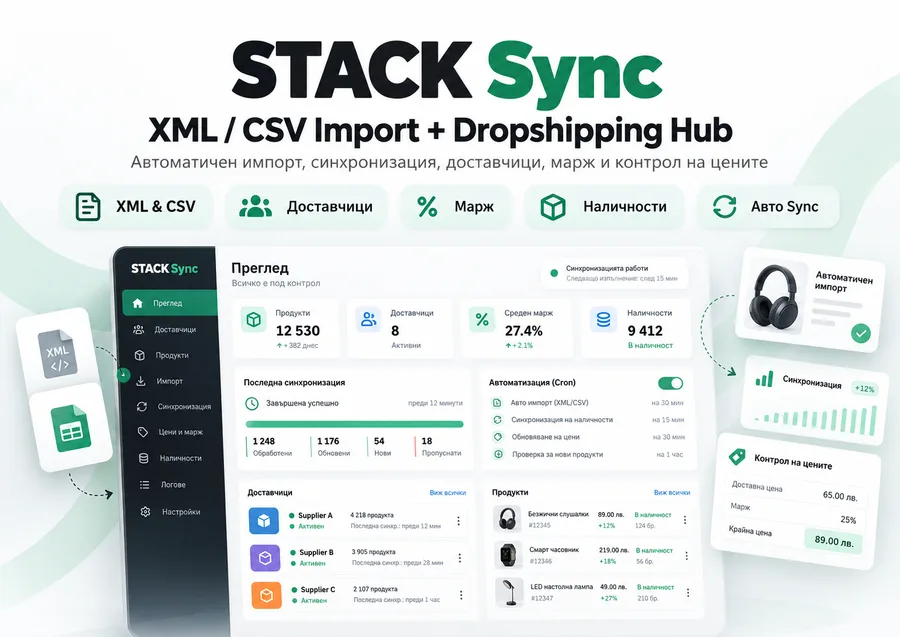
More about STACK Sync
STACK Sync automates one of the most time-consuming and error-prone WooCommerce tasks: manually updating products, prices and stock.
Whether you work with suppliers, XML or CSV catalogues, dropshipping partners or a large product database, STACK Sync saves hours of work and keeps your store up to date automatically.
Connect your product source, configure the rules once and let the plugin handle the rest.
STACK Sync can automatically create products, update existing ones, synchronise prices and stock, and import images, categories, attributes, SKUs and other essential product data.
With the new Dropshipping Hub you can track product cost, selling price, profit and margin directly in WordPress. The plugin can store supplier information and supplier SKUs and apply a minimum profit rule to keep selling prices above your chosen margin.
Manage your entire catalogue through automatic synchronisation instead of editing hundreds of products manually.
The plugin supports XML and CSV sources, with flexible mapping between feed fields and WooCommerce.
You can map fields for:
Product name
Price
Cost price
Sale price
SKU
Supplier SKU
Stock
Description
Short description
Categories and subcategories
Attributes and variations
Images
Additional product data
Key features:
XML Import
CSV Import
Automatic synchronisation
Automatic product creation
Updates to existing products
Price and stock synchronisation
Image imports
Category and subcategory imports
Attribute and variation imports
SKU and supplier SKU support
Flexible field mapping
Scheduled imports through cron
Synchronisation logs and history
Support for large product catalogues
Dropshipping Hub
Supplier management
Cost and selling price tracking
Profit and margin calculations
Minimum profit protection
Products & Margins dashboard
Warnings for products at risk
Cost price change history
Dry run / preview before a live import
STACK Sync is particularly useful for:
Online stores with external suppliers
Dropshipping stores
Stores with frequently changing prices
Stores with large catalogues
Retailers receiving XML or CSV files from suppliers
WooCommerce projects where stock and margins must remain under control
Less manual work means fewer mistakes.
There is no need to check manually whether a supplier has changed a price, a product is out of stock or your margin has fallen too low.
STACK Sync can monitor these changes for you.
Licences are managed through STACK.bg and include automatic updates directly in WordPress.
STACK Sync goes beyond XML importing.
It is a tool for automating product catalogues and managing dropshipping in WooCommerce.
Questions and answers.
Which formats can I import?
XML and CSV files from suppliers and external systems are supported.
How often can the catalogue be updated?
Run imports manually or automatically through cron at your chosen interval.
Are images and categories updated?
Yes. The plugin can create or update categories, subcategories and images.
Can I choose which products are imported?
Yes. Use field mapping and processing rules to control the import.
Ready to use STACK Sync?
Choose a licence for your site and manage access and updates in your account.